How to record a Telegram circle video on iPhone
Updated July 30, 2026
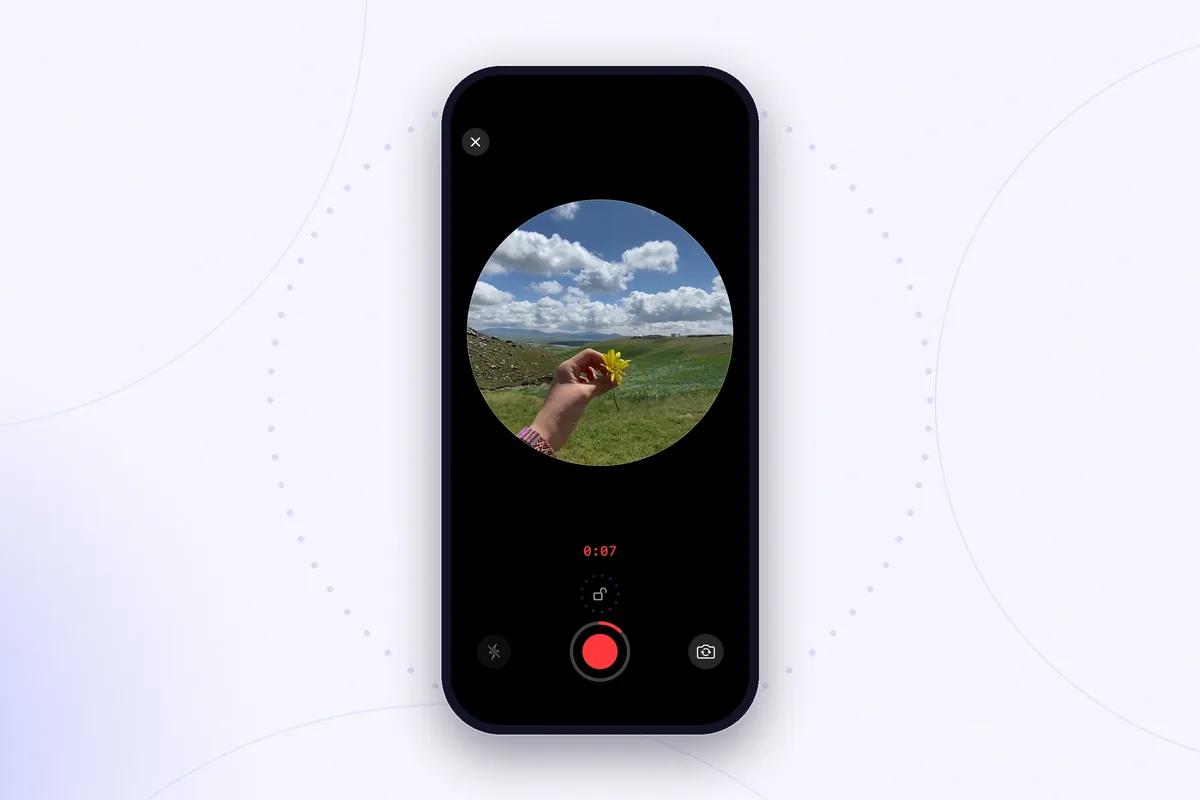
Circle videos — Telegram officially calls them video messages — are the fastest way to put your face in a chat. On iPhone the recording flow is genuinely quick, but it is built entirely out of unlabeled gestures: an icon that silently changes meaning, hold-to-record, a slide-to-lock, a mid-recording camera flip. Miss one gesture and the recording cancels itself, or sends before you were ready.
This guide walks through the whole iPhone flow, the tricks that make a circle look and sound better, and — just as important — what you can and cannot do with the circle after it lands in the chat.
Recording a circle inside Telegram, step by step
- Open the chat and find the icon next to the message field. If it shows a microphone, tap it once — it switches to a camera. The same button records voice messages in one mode and circles in the other, and Telegram remembers which mode you used last, which is why the icon is not always what you expect.
- Press and hold the camera icon. Recording starts immediately with the front camera — there is no countdown, and the microphone is live from the first frame. Whatever your face is doing when you touch the button is the first thing your recipient sees.
- Keep holding for as long as you talk. The moment you lift your finger, the circle is sent — release is send, not stop. To bail out instead, slide your finger left to the cancel area without lifting it.
- Slide up to lock for hands-free recording. A lock icon appears above the button; slide up onto it and you can let go, hold the phone properly with both hands, and end the recording deliberately with a tap instead of a nervous release.
- Flip the camera mid-recording if you need to. Tap the camera-flip control while recording to switch between the front and rear cameras — handy when the second half of the message is about the thing you are looking at, not you.
One hard limit to plan around: a video message runs up to one minute, per Telegram's own announcement of the format. When the time is up, the circle sends itself — so put the point of the message at the start, not the end.
Five habits that make circles look better
- Lock first, talk second. Slide up to lock as soon as recording starts. Unlocked circles wobble, and an accidental finger-lift sends half a sentence.
- Face the light. The front camera has a small sensor; with a window behind you, you become a silhouette. Turn so the light lands on your face.
- Hold the phone at eye level, about an arm's length away. The round crop is tight — a low angle turns every circle into a chin study.
- Mind the audio. Circles use the phone microphone, which happily records the kettle, the street, and the wind. A quiet room does more for a circle than any camera trick.
- Rehearse the minute. One take, sixty seconds, no trimming inside Telegram. If a message needs structure, say the conclusion first.
What happens after you hit send
Here is the part the recording flow does not tell you: the circle now exists only inside that chat. Telegram compresses video messages aggressively, and the file behind the round mask is an ordinary small square video. That has three practical consequences:
- To keep a copy outside Telegram, you have to export it deliberately — our guide on saving a Telegram circle video on iPhone covers every way to do that.
- A saved circle stops being round: it lands in your camera roll as a square clip with white corners around the circle, which need replacing before the clip looks presentable anywhere else.
- Reposting a circle to a vertical format takes one more step — see putting a Telegram circle into an Instagram Story.
The other way around: record first, convert later
If a circle is worth keeping — a birthday message, an announcement, anything you might want again — consider inverting the workflow. Record a normal video with the iPhone camera first: you get retakes, framing control, full resolution, and a clean original that stays in your camera roll. Then turn that video into a circle for Telegram. The chat gets its round message; you keep a master copy that was never compressed by a messenger.
Rondo is built for exactly this: record circle-style videos with retakes and a proper preview, or turn any saved video into a round one — then export a clean square or 9:16 version whenever you need the same clip outside Telegram.
Get Rondo for iPhoneFAQ
Why did my circle send before I finished?
Because lifting your finger is the send gesture. While you hold the button, release means “done — send it”. Slide up to the lock icon at the start of every recording; a locked recording ends only when you tap stop, and slide-left cancels it entirely.
Can I record a circle with the rear camera?
Yes. Recording always starts on the front camera, but the camera-flip control works mid-recording, so you can switch to the rear camera — and back — without stopping the circle.
How long can a Telegram circle video be?
Up to one minute — the limit Telegram set when it introduced video messages. At the one-minute mark the recording stops and sends. For anything longer, record a regular video first and send it as a normal clip, or break the message into several circles.